How to Reduce PCB Costs: From Materials to Board Size
PCB manufacturing cost saving method. The size of the board is naturally an important point. The smaller the PCB board, the lower the cost. In addition to this, the number of PCB layers must also be taken into consideration.
Get Your PCB Quote!
Table of Contents
- 1. Введення
- 2. Кількість шарів та штраф за ламінування
- 3. Вибір матеріалу друкованої плати
- 4. Вага міді та пастка надмірного проектування
- 5. Перехідні отвори та отвори: геометричні фактори, що впливають на вартість
- 6. Оздоблення поверхонь: балансування терміну придатності з витратами на пайність
- 7. Розмір друкованої плати
- 8. Фактори, що впливають на вартість друкованих плат: економія на стороні складання
- 9. Стратегічні закупівлі: понад ціну за одиницю
- FAQ
- Резюме
- Ключові винесення
Table of Contents
- 1. Введення
- 2. Кількість шарів та штраф за ламінування
- 3. Вибір матеріалу друкованої плати
- 4. Вага міді та пастка надмірного проектування
- 5. Перехідні отвори та отвори: геометричні фактори, що впливають на вартість
- 6. Оздоблення поверхонь: балансування терміну придатності з витратами на пайність
- 7. Розмір друкованої плати
- 8. Фактори, що впливають на вартість друкованих плат: економія на стороні складання
- 9. Стратегічні закупівлі: понад ціну за одиницю
- FAQ
- Резюме
- Ключові винесення
1. Introduction
In our experience, cost reduction isn ‘t about buying cheaper components; it’s about aligning your design constraints with the capabilities of high-volume manufacturing lines. When we see a design that forces a 0.2mm mechanical drill to hit a 0.35mm pad, we know the scrap rate is going to climb, and that risk is priced directly into the quote. Achieving a 10% to 30% reduction in board cost usually requires looking at the board through the eyes of a process engineer rather than just a circuit designer. Every choice, from the distance between a via and a SMT pad to the specific grade of FR-4, carries a price tag that scales exponentially with volume.
2. Layer Count and the Lamination Penalty
The most direct way to slash PCB costs is to reduce the layer count, but the reasoning is more complex than just “less material.” Each pair of layers added to a board requires an additional lamination cycle. A 4-layer board undergoes one lamination cycle; a 6 -layer board requires more precision and material handling, but once you move into 8, 10, or 12 layers, the registration requirements become much tighter. Misalignment by even a few microns during lamination can ruin an entire panel of boards .
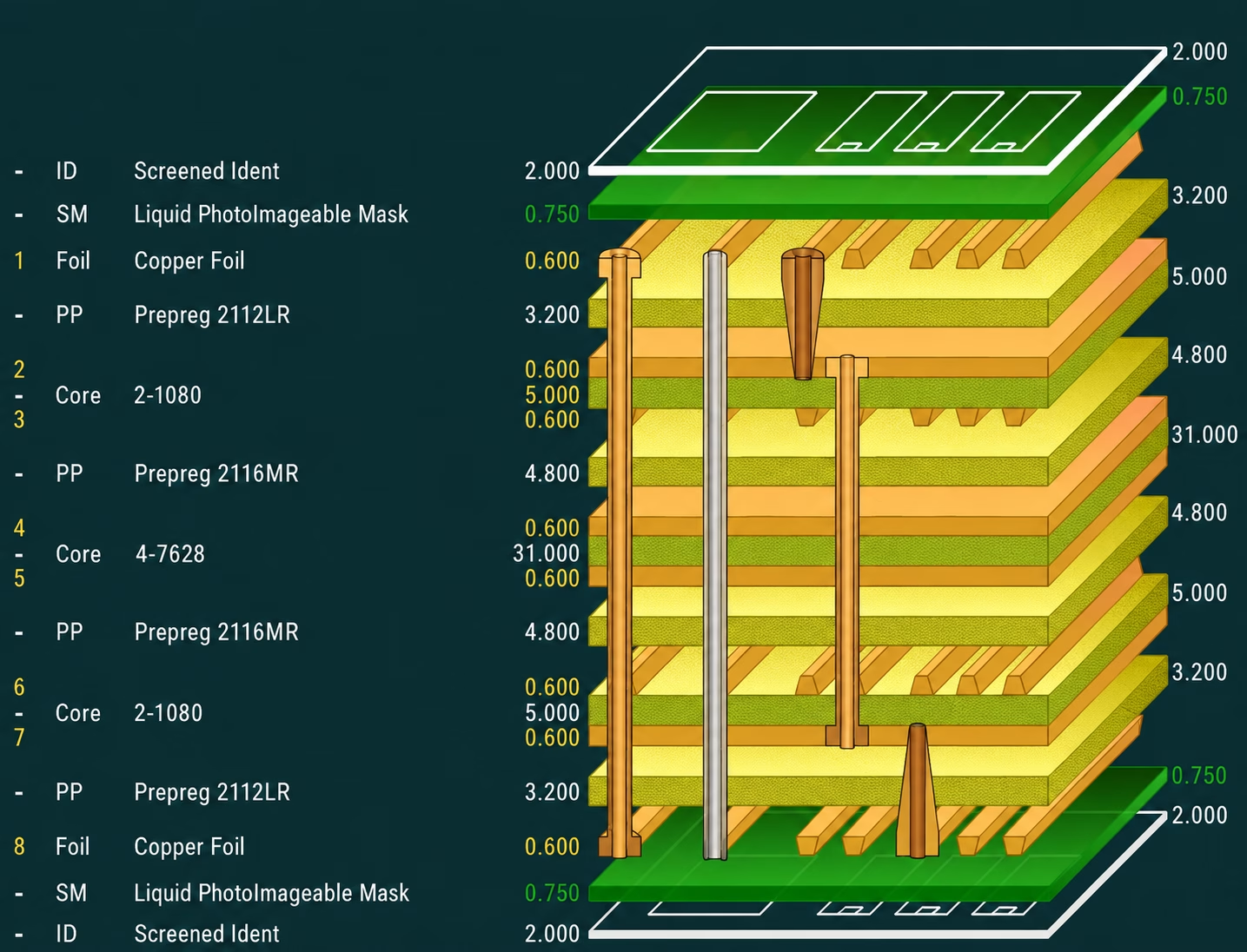
We’ve seen designs where a 6-layer board could have been a 4-layer board if the designer had spent an extra day optimizing the power plane routing. At PCBAndAssembly, we often suggest that for low-to -medium complexity digital designs, the “sweet spot” for cost-to-performance is the 4-layer stack up. It allows for a solid ground plane and a dedicated power plane while keeping fabrication steps minimal.
| Layer Count | Typical Relative Cost | Primary Cost Driver | Notes |
| 2 Layers | 100% | Base Fabrication | Standard for simple power/ analog |
| 4 Layers | 160% – 2 00% | Lamination + Extra Prepreg | The standard for most digital designs |
| 6 Layers | 250% – 320% | Alignment & Lamination | Significant jump due to processing time |
| 8 Layers | 380% – 450% | Registration & Drill Precision | Exponential increase in scrap risk |
Table 1: Relative Cost Increase by Layer Count (Base 2-Layer = 100%)
Note: These ranges reflect typical pricing from standard batch manufacturers. Prototype shops, domestic fabs, and specialty HDI facilities will vary significantly.
When to Stick with 4 Layers
If your design has the density to fit on 4 layers but you’re worried about EMI , it is often cheaper to spend time on shielding or layout optimization than to jump to 6 layers. We’ve found that many engineers use 6 layers as a “safety net” for signal integrity, but unless you are dealing with high-pin -count BGAs (like 0.8mm pitch or smaller) that physically require the extra routing channels, the 4-layer stackup remains the king of cost-efficiency.
3. PCB Material Selection
Standard FR-4 is the workhorse of the industry because of its price point and predictable performance. However, as soon as a design enters the realm of lead-free soldering or high-speed signals , material selection becomes a major cost lever. The most common mistake we see is specifying a high Glass Transition temperature (Tg) material when it isn’t strictly necessary for the operating environment.
Tg 130-140°C is standard, while Tg 170-180°C is considered “High-Tg.” While High-Tg materials are better at resisting the thermal stress of multiple reflow cycles (essential for lead-free assembly), they are also roughly 20-40% more expensive depending on the brand and supplier, and harder on the drill bits. We’ve seen that for most consumer and standard industrial applications, a mid-Tg material (around 150°C) offers the best balance of reliability and cost.
Furthermore, when frequencies exceed 5 GHz, designers often jump straight to PTFE-based materials (like Rogers 43 50B or 4003C). These materials can cost 5 to 10 times more than standard FR-4. A common value engineering tactic we use is the “hybrid stackup.” Instead of making the whole 6-layer board out of expensive high-speed material, we use the specialty material only on the outer layers (Layers 1 and 2) where the high-speed traces are routed, while using standard, inexpensive FR-4 for the inner cores. This can often cut the raw material cost of an RF board by 40%.
4. Copper Weight and the Over-Engineering Trap
Copper weight is one of those specifications that engineers often “bump up” just to be safe . We’ve seen many boards specified with 2oz (70µm) copper on signal layers where 1oz (35µm) would have sufficed. The cost of 2oz copper isn’t just the price of the metal; it’s the processing time. Thicker copper takes longer to etch, and as the copper gets thicker, the “undercut” (the tendency of the etchant to eat away the copper under the photoresist) becomes harder to control.
If you specify 2oz copper, you generally cannot have 4-mil traces ; you might be forced to 6-mil or 8-mil minimums. This forces the board size to grow, which in turn raises the cost. At PCBAndAssembly, we recommend using 0.5oz base copper for signal layers ( which plates up to ~1oz) and reserving 2oz or 3oz copper only for dedicated power planes or boards requiring high current handling (like motor controllers). If a specific trace needs to carry high current, it is almost always more cost-effective to make the trace wider than to make all the copper on the board thicker.
| Copper Weight (oz) | Finished Thickness (µm) | Min Trace/Space (mil) | Etch Cost Impact |
| 0 .5 oz | ~18 µm | 3 / 3 | Baseline |
| 1.0 oz | ~35 µm | 4 / 4 | Low |
| 2 .0 oz | ~70 µm | 6 / 6 or 8 / 8 | Moderate (Longer etch) |
| 3.0 oz | ~105 µm | 10 / 10 | High (Special handling) |
Table 2: Copper Weight vs. Minimum Trace/Space Limits
5.Vias and Holes: The Geometric Cost Drivers
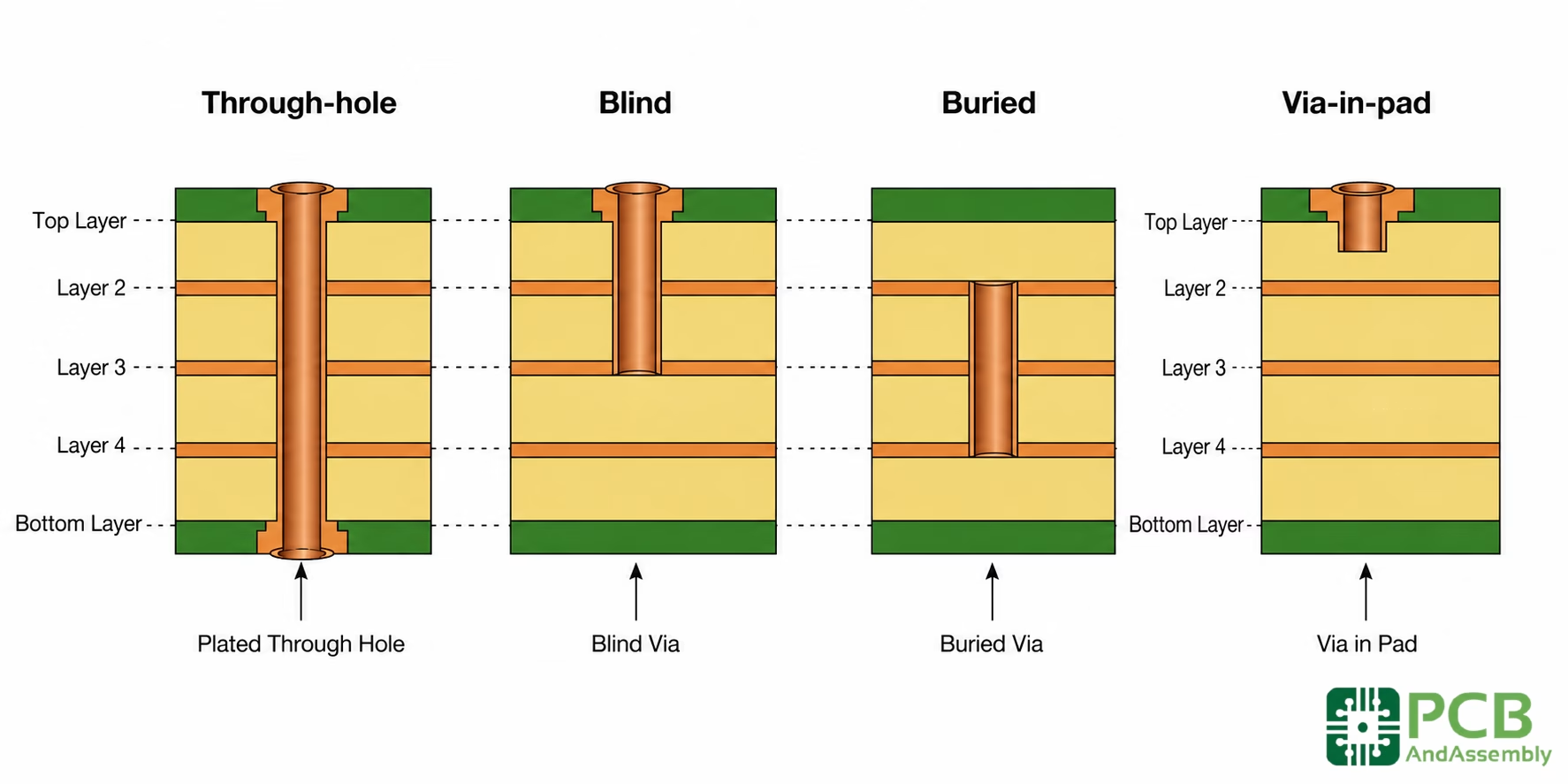
The number of holes and the types of vias used are arguably the biggest drivers of fabrication time. Mechanical drilling is a sequential process—the drill head has to move to every single coordinate. When we see a board with 5,000 vias , we know the machine time alone will drive up the price. However, the *type* of via is even more critical than the quantity.
Blind and Buried Vias
The moment a design moves from through -hole vias to blind or buried vias, the cost can jump by 50% to 100%. This is because blind/buried vias require “sequential lamination.” You have to drill and plate the inner layers before you can laminate the outer layers. We’ve found that many designers use blind vias because they’ve run out of routing room, but a slight increase in board size (even 5%) is often significantly cheaper than adding the complexity of blind vias.
Via-in-Pad (VIPPO)
Via-in-pad is necessary for some high-density B GA designs, but it requires the manufacturer to fill the via with conductive or non-conductive epoxy and then plate copper over the top to create a flat surface for soldering. This is an multi-step process. In our experience, if you can move the via just 0.2mm away from the pad and use a standard “dog-bone” fan out, you eliminate the need for the filling and capping process entirely.
Drill Bit Diameters
The industry “standard” for cost-effective mechanical drilling is usually 0.25mm to 0. 3mm. As soon as you specify a 0.2mm drill or smaller, the drill bits become much more fragile . They break more often, the machines must run at slower feed rates, and the “drill wander” (the tendency of the bit to flex) becomes a major yield issue. We’ve seen drill wander increase sharply when FR-4 feed rates are applied to high-density designs, leading to broken annular rings. Keeping your smallest drill at 0.3mm whenever possible is one of the easiest ways to ensure high yields and lower costs.
6. Surface Finishes: Balancing Shelf Life with Solderability Costs
Surface finish selection is often treated as an afterthought, but it impacts both the fabrication price and the assembly yield. The two heavy hitters are HASL (Hot Air Solder Leveling) and ENIG (Elect roless Nickel Immersion Gold).
HASL is the cheapest option, but it has a significant drawback for modern designs: it is not perfectly flat. For fine-pitch components (0.5mm pitch and below), the “humps” of solder in HASL can cause components to tilt or bridge during reflow. ENIG, while more expensive (typically carrying a noticeable premium on the board cost, though the exact amount varies with gold prices and board area), provides a perfectly flat surface and excellent shelf life.
A hidden cost-saver is OSP (Organic Solderability Preservative). It’s flat, inexpensive (comparable to or cheaper than HASL), and environmentally friendly. However, OSP has a short shelf life (usually 6 months) and can be easily damaged by handling. We recommend OSP for high -volume consumer products where the boards are assembled immediately after fabrication. For industrial or medical products that might sit in a warehouse for a year, ENIG is usually the better investment despite the higher upfront cost, as it prevents costly assembly failures later.
| Finish | Cost Level | Flatness | Shelf Life | Best Use Case |
| HASL (Lead-Free) | Low | Poor | 12 Months | Through-hole, large SMT |
| OSP | Lowest | Excellent | 6 Months | High-volume, immediate assembly |
| ENIG | High | Excellent | 12+ Months | Fine-pitch B GA, gold bonding |
| Immersion Silver | Medium | Excellent | 6-12 Months | High-speed signals, RF |
Table 3: Comparison of Common Surface Finishes
7. PCB Size Design
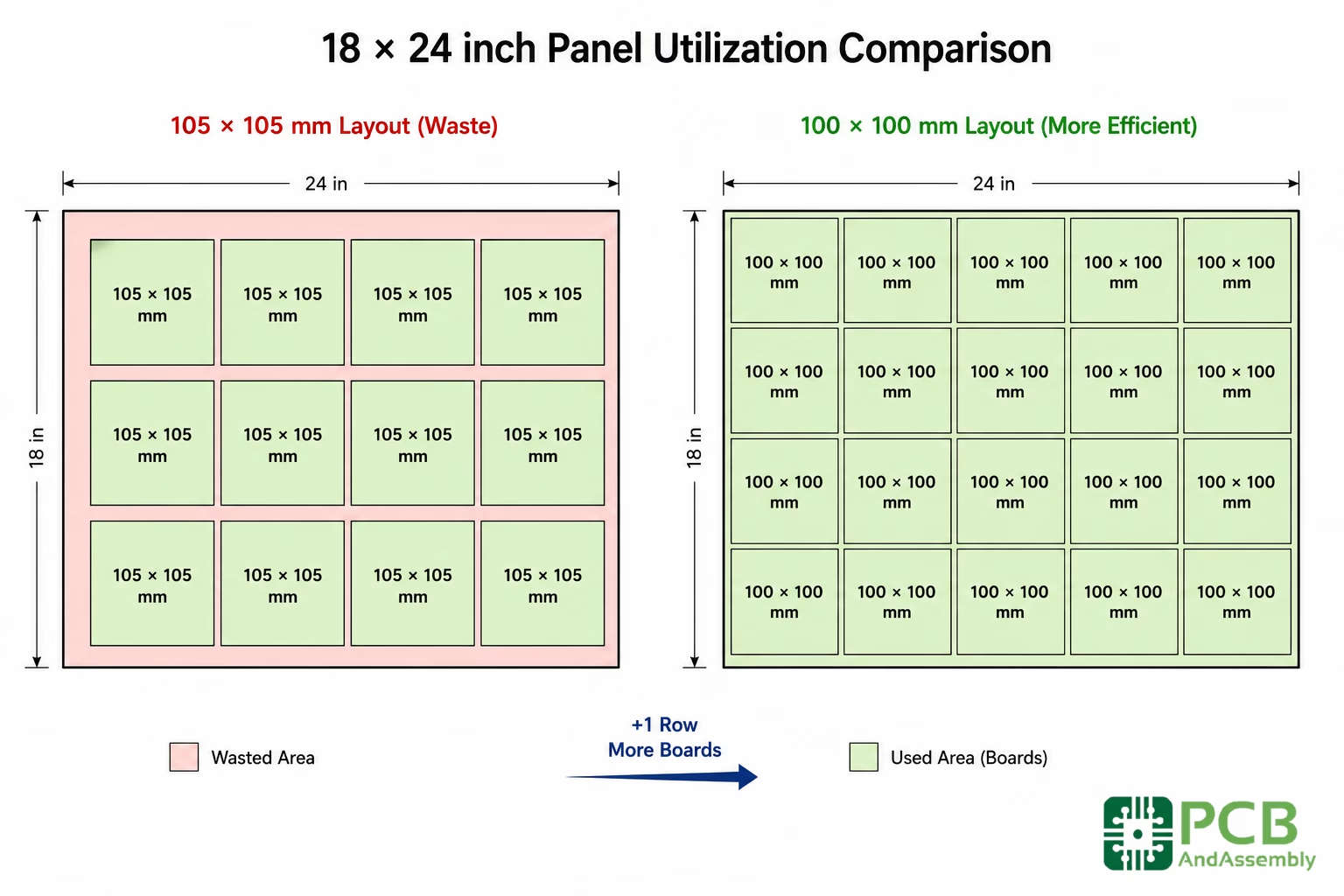
PCBs are not manufactured as individual boards; they are made on large panels (typically 18″x24″ or 12 “x18”). You are paying for the whole panel, whether your boards fill it or not. If your board dimensions are 105mm x 105mm, you might only fit a few on a panel, leaving a huge amount of wasted “margin” material. If you can shrink that board to 100mm x 100mm, you might fit an entire extra row of boards on the panel.
Remember, the larger the board, the greater the cost. The size of a board has a direct relationship to the final price a customer will pay for it.
Need PCB Manufacturing or Assembly?
Get a free quote within 24 hours. We specialize in prototype-to-production PCB/PCBA for hardware teams worldwide.
8. PCBA Cost Drivers: Assembly Side Savings
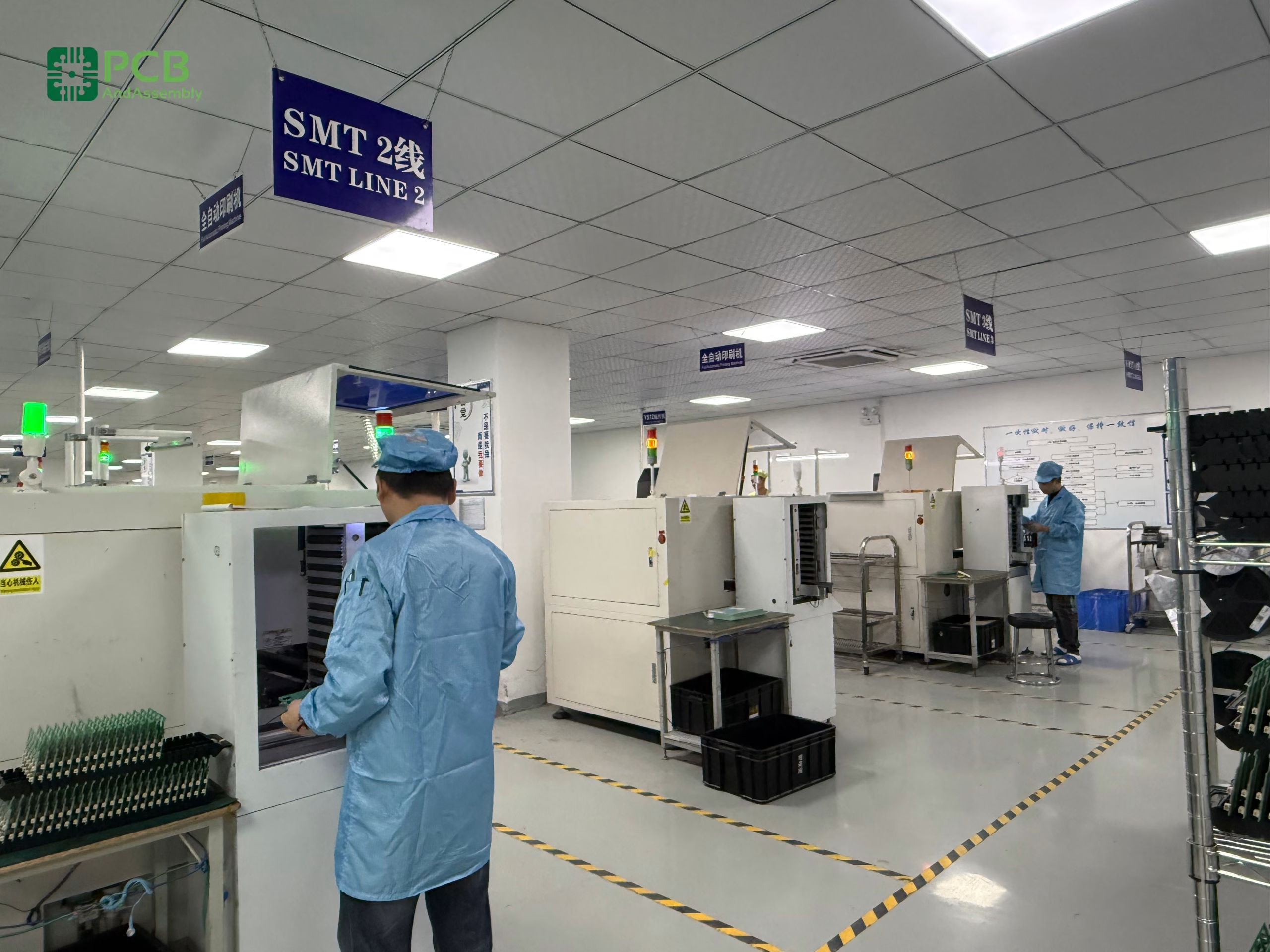
Once the bare board is fabricated, the assembly process (PCBA) introduces a new set of cost variables. Component sourcing and placement complexity are the primary drivers here. One of the most effective strategies for reducing PCBA costs is “B OM Consolidation.”
BOM Consolidation
If your design uses 10 different values of 10k, 12k, and 15k resistors, ask yourself if they could all be 10k. Every unique part number (SKU) on your Bill of Materials requires a different feeder on the pick-and- place machine. Most assembly houses charge a “setup fee” per unique line item. By consolidating your passives, you reduce the number of reels the operator has to load, which translates directly to lower labor costs and fewer chances for placement errors. Single-Sided vs. Double-Sided Assembly
Placing components on both sides of the board requires two separate passes through the SMT line—two stencils, two solder paste prints, and two reflow cycles. In our experience, double-sided assembly can meaningfully increase assembly costs compared to single-sided—the impact varies based on bottom-side component density and whether adhesive dispensing is required, but it is rarely a small difference. If you have a few non-critical components on the bottom side, try to move them to the top. Even if it requires making the board slightly larger, the savings from eliminating the second assembly pass usually far outweigh the cost of the extra PCB area.
Component Sourcing
Supply chain volatility has made component sourcing a high-stakes game . We’ve seen production lines shut down because a $0.05 capacitor went out of stock. To mitigate this, always specify “alternates” for common passives and semiconductors in your BOM. At PCBAndAssembly, we’ve found that designs with pre-approved alternates move significantly faster through procurement—when a preferred part goes on allocation, we can immediately substitute a verified equivalent without waiting for engineering sign-off, which is often the bottleneck that delays production by weeks.
9. Strategic Procurement: Beyond the Unit Price
Finally, there is the human and logistical element of cost saving. The “Total Cost of Ownership” for a PCB includes shipping , tariffs, and the cost of potential rework.
Lead Time vs. Cost
If you need boards in 24 hours, you will pay a significant premium—typically several times the standard price . If you can plan your prototypes two weeks in advance, you can use standard “pooling” services that combine your order with others, significantly dropping the price. For production runs, giving the manufacturer a few extra days of lead time can often unlock a modest discount because it allows them to optimize their machine scheduling.
Volume Breaks
The price-per-board curve for PCBs is incredibly steep. A prototype run of 10 boards might cost $20 per board, but at 1,000 boards, that same design might be $2.00. We’ve seen many startups order 100 boards three times in a row, paying “small batch” prices each time. If your forecast is stable, ordering 300 or 500 boards at once can cut your unit price nearly in half. We often advise clients to look at their “Economic Order Quantity” (EOQ) to find the point where the cost of carrying inventory is lower than the savings from a larger production run.
FAQ
Does adding more layers always increase cost proportionally?
No, and the relationship is non-linear. The jump from 2 to 4 layers is typically the largest relative increase—often roughly double—because it introduces a new lamination and drilling cycle. Moving from 8 to 10 layers, by contrast, usually adds 15%–25% because the per-layer infrastructure cost is spread across a larger base. As complexity increases, base material becomes a smaller fraction of total cost, and incremental layers cost less at the margin.
What is the single biggest “hidden” cost in PCB design?
Answer: T ighter-than-necessary tolerances. Specifically, minimum trace/space and minimum hole sizes. If you design for 4 -mil traces but your signals only need 6-mil, you are paying for a high-precision process that adds no value to your circuit.
Can I save money by using a smaller PCB?
Answer: Usually, yes, but only if the smaller size doesn’t force you into more layers or blind/buried vias. A small, complex 8-layer board is often more expensive than a larger, simpler 4-layer board.
Can I save money by using a thinner board?
Generally not. The standard 1.6 mm (0.062″) thickness is the most common and competitively priced. Thinner boards—for example, 0.4 mm—are structurally flexible, which requires special handling carriers during SMT assembly. That additional handling adds labor and risk. Thinner boards are sometimes necessary for mechanical constraints, but they are not a cost-reduction strategy.
Does the color of the solder mask affect the price?
Answer: For small quantities, green is the standard and cheapest. Other colors like black, white, or red often require a “line wash ” at the factory, which can add a setup fee or extra day of lead time. For high volumes, the color cost is negligible.
My design has a mix of tight and loose areas—do I have to meet the tightest spec everywhere?
No, and this is a critical point. You only pay the premium for tight tolerances if they apply globally. Necking down traces in a BGA fan-out zone while using 6-mil routing elsewhere keeps the majority of the board in the standard yield tier. Similarly, if only one area of your board requires blind vias, check whether the routing can be solved with through-hole vias and careful layer assignment first.
Should I use through-hole or SMT components to save money?
Answer: SMT (Surface Mount Technology) is significantly cheaper for high-volume assembly because it is fully automated. Through- hole components often require manual soldering or a separate wave-soldering process, which adds labor cost.
Summary
Reducing PCB costs is an exercise in restraint and communication. By understanding how design choices—like layer count, copper weight, and via types—translate into manufacturing steps, engineers can make informed trade-offs. The goal is never to compromise the integrity of the product, but to strip away the “over-spec” that provides no functional benefit. Whether it’s through the use of hybrid stackups for high-speed designs, consolidating your BOM to reduce assembly setup, or adjusting board dimensions for better panel utilization, the opportunities for savings are rooted in the physics of the manufacturing process.
Key Takeaways
- Layer count is the primary cost lever:Reducing a design from 6 to 4 layers can deliver substantial savings in fabrication costs, often 25% or more depending on the factory and volume.
- Avoid over-specifying copper :Use 1oz copper for signals unless high current is strictly required; 2oz copper limits trace density and increases etch costs.
- Simplify your via strategy:Eliminate blind/buried vias and via-in-pad whenever possible to avoid expensive sequential lamination and filling processes.
- Panelize for yield:Small changes in board dimensions can lead to significantly better material utilization on the 18″x24″ master panel.
- Consolidate your BOM:Using fewer unique resistor and capacitor values reduces SMT setup time and potential placement errors.

Get Quote Free