PCB Test Point Design for Assembly: A Practical DFT Checklist
Design PCB test points for assembly by matching ICT, flying-probe, functional-test and debug access to pad, clearance, support and handoff requirements.
Get Your PCB Quote!

Table of Contents
Table of Contents
An assembly-ready PCB test point is more than exposed copper. It needs a defined test objective, a compatible probe or interface, a clear approach path, suitable local support, and revision-controlled test data. PCB test point design should therefore begin with the manufacturing test strategy—not with a generic pad-size table.
This guide turns that principle into a practical design-for-test (DFT) workflow. It focuses on access planning for assembled boards while keeping bare-board electrical test, inspection, functional test, and boundary scan in their proper roles.
Quick Takeaways
The shortest path to usable test access is to select the test method first, capture the supplier’s actual constraints, and verify the populated assembly before release.
- Define the test objective and responsible owner before assigning test points.
- Convert the assembler’s, tester’s, or fixture vendor’s current requirements into CAD rules instead of copying universal “minimums.”
- Check probe approach, component envelopes, tooling, clamps, and board support—not only the bare PCB view.
- Document inaccessible risks and assign a complementary verification method.
- Release the test-point schedule, coordinates, net data, drawings, and PCB revision as one synchronized package.
What Makes a PCB Test Point Assembly-Ready?
An assembly test point is ready for production only when its electrical purpose, physical target, access path, mechanical context, and identifying data all agree with the intended test process.
A test point is an intentional electrical access location used for measurement, stimulus, programming, or diagnosis. The physical target may be a dedicated pad or, where the applicable rule set permits it, another exposed feature such as a via. In CAD workflows, test-point assignment can also distinguish between fabrication and assembly uses. Altium’s test-point rule documentation and assignment workflow show these as separate use categories rather than interchangeable labels.
That distinction matters:
- Fabrication test accesssupports electrical testing of the unpopulated printed board.
- Assembly test accesssupports checks performed after component population, such as ICT, flying probe, programming, functional interfaces, or diagnosis.
A usable assembly target therefore needs five conditions:
- It reaches an electrically relevant node.
- It provides an exposed and contact-compatible target.
- It matches the intended probe, connector, or controlled interface.
- It has a collision-free approach and suitable local board support.
- Its ID, net, side, coordinates, intended method, and revision are synchronized with the released design.
Choose the Test Method Before Setting Pad Rules
The intended test method sets the access model. It determines whether the design needs repeatable fixture-side coordinates, movable-probe paths, a powered interface, a programming connection, or a boundary-scan chain.
ICT / Bed-of-Nails
In-circuit testing (ICT) commonly uses a fixture to contact selected nodes repeatedly. That makes target coordinates, board registration, probe selection, access side, fixture keep-outs, and support locations part of the layout problem. Keysight’s ICT system overview describes manufacturing ICT as a system-level activity rather than a property created by adding pads alone.
Flying Probe
Flying-probe equipment moves probes to programmed targets and can reduce the need for dedicated bed-of-nails fixture hardware. It does not remove DFT constraints: targets must still be identifiable, reachable, contact-compatible, and supported. Component bodies, tall parts, shields, mask openings, and probe approach remain relevant.
Functional Test and Programming/Debug
Functional testing applies power and checks behavior at a system or subsystem level. Access may use connectors, headers, edge contacts, dedicated pads, or a custom interface. The design must address safe power application, sequencing, loads, firmware or configuration inputs, and fixture connections within the project test plan. Those requirements are not implied by a test-point symbol alone.
Boundary Scan
Boundary scan can support assembled-board interconnect testing, programming, and debug when the devices, chain architecture, design data, and test support are compatible. The active IEEE P1149.1 revision project describes work on the standard. Boundary scan remains a design-dependent complement, not a universal replacement for inspection, functional verification, or essential physical access.
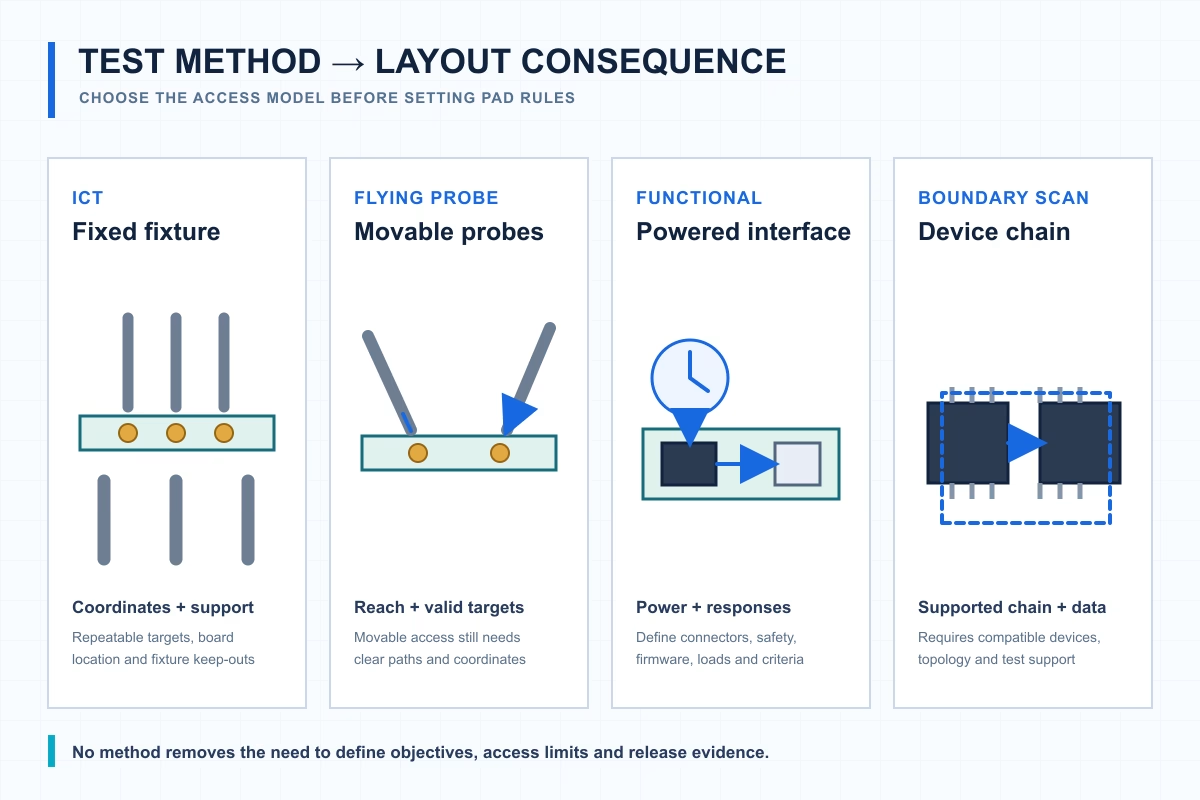
The method changes the access obligation: fixed fixture coordinates, movable probe paths, a powered interface, or a supported device chain.
The practical conclusion is that each method creates a different layout obligation:
| Method | Physical access model | Layout implication | What it does not replace |
| ICT / bed-of-nails | Repeatable fixture probes contact assigned targets | Coordinate targets, registration, access side, keep-outs, and support with the fixture concept | Functional behavior or every hidden-joint risk |
| Flying probe | Programmed probes move between accessible targets | Preserve probe paths, target visibility, component clearance, and stable contact | DFT rules, powered functional proof, or all visual inspection |
| Functional test | Powered connectors, pads, or custom interfaces stimulate and observe the assembly | Define interface, power, safety, firmware, loads, and expected responses | Fine-grained physical fault isolation by itself |
| Programming/debug | Connector, header, edge interface, or controlled pad field | Preserve recovery access, pinout control, orientation, and electrical conditions | Manufacturing defect screening by itself |
| Boundary scan | Supported device chain provides logical access | Plan chain topology, supported devices, control pins, and required design files | Unsupported nets, analog behavior, inspection, or all physical access |
Build the Net-Access Plan Before Layout
Start with the failures and measurements the manufacturing test must address, then assign access priority; do not scatter pads first and invent coverage later.
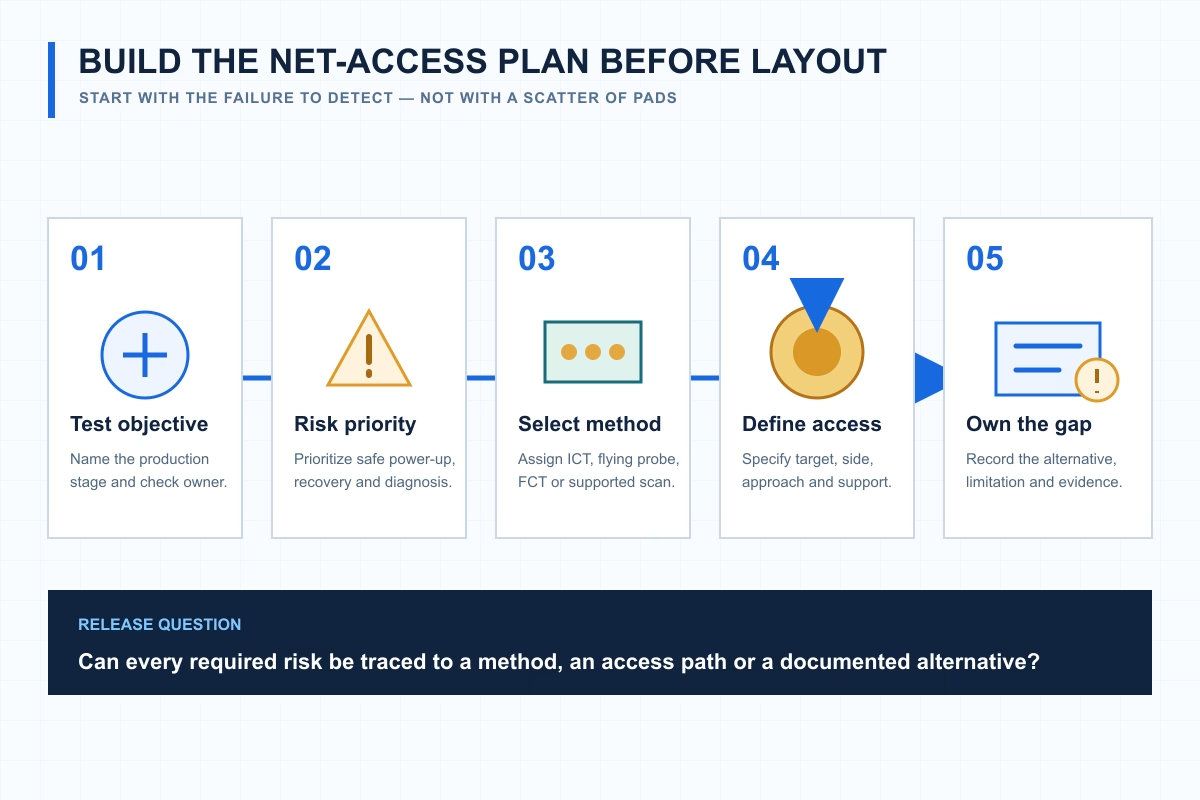
Net-access planning connects each manufacturing risk to a method, a physical interface or a documented alternative.
Identify the Test Objective and Owner
Separate the objectives before choosing targets. Bare-board continuity, assembly-defect screening, device programming, powered functional verification, and engineering debug occur at different stages and may have different owners. For each objective, record who specifies the check, who implements it, where it runs, and what evidence closes it.
This prevents a common handoff failure: a design contains labeled points, but their intended user is unclear. The bare-board supplier, assembly tester, programming fixture, and bench engineer may need different access data.
Prioritize Nodes That Control Safe Power-Up and Diagnosis
The final priority list depends on circuit risk and the selected test plan, but the review should consider:
- ground references, supply rails, and isolated power domains;
- enable, reset, boot-mode, and programming/debug paths;
- clocks and communications where physical probing is electrically appropriate;
- analog or safety-monitoring nodes only where added access will not compromise performance;
- isolation points needed to distinguish likely fault regions.
These are review prompts, not a mandate to probe every listed net. For sensitive nodes, the electrical consequence of the target, via, or stub must be evaluated as part of the actual circuit design.
Turn Tester Constraints into PCB Design Rules
Obtain the current DFT rule set from the assembler or fixture/test vendor and load its constraints into the PCB tool before assigning test points.
Target and Contact Variables
Confirm the exposed target size, allowed feature types, probe-tip or contact style, and any restrictions on using vias. Also define the solder-mask opening, registration allowance, and acceptable contact-surface condition. A feature can be electrically connected yet unsuitable for repeatable contact.
Test-point rule types include size, hole, usage, spacing, component-clearance, and board-edge concepts. The categories are useful planning prompts, but the numerical values must come from the selected manufacturing and test path. Pads and vias may be assigned as targets in a CAD workflow only when they satisfy the applicable rules and remain suitable after assembly.
Spacing and Clearance Variables
Capture target-to-target spacing, component-body clearance, tall-part clearance, board-edge and tooling clearance, panel-rail and clamp keep-outs, and the permitted probe approach by side. Also check the tolerances that affect alignment: target fabrication, mask registration, board location, fixture manufacture, and probe mechanics.
Why Copied “Minimums” Fail
A copied minimum can omit the combined effect of probe type, fixture tolerance, board registration, mask opening, component height, access angle, contact force, board support, and expected use. Even if a value worked on another product, it may not fit the current tester or mechanical stack.
The rule sheet should therefore preserve both the requirement and its source.
Place Test Points for Reach, Support, and Repeatability
A target can pass an electrical or CAD rule and still fail in production. The populated board may block the probe, the fixture may lack local support, or panel hardware may occupy the approach path.
Prefer a Consistent Access Side When the Fixture Strategy Permits
Keeping targets on a consistent side may simplify a fixture and its setup, but it is not an absolute rule. Double-sided assemblies, component density, tester capability, and required coverage may justify access from both sides. Make the decision with the fixture or test vendor, then encode the permitted side in the rule set and test-point schedule.
Check the Assembly Envelope
Review the 3D or otherwise controlled mechanical representation of the populated assembly. Include connectors, heatsinks, shields, cables, batteries, enclosure hardware, retainers, and depanelization features. A bottom-side probe may also require a top-side support location, so parts on one face can constrain contact from the other.
The access-envelope review should show the target, mask opening, intended probe path, nearby component body, board edge or rail, and support location. Dimensions should remain symbolic until the selected supplier provides the applicable values.
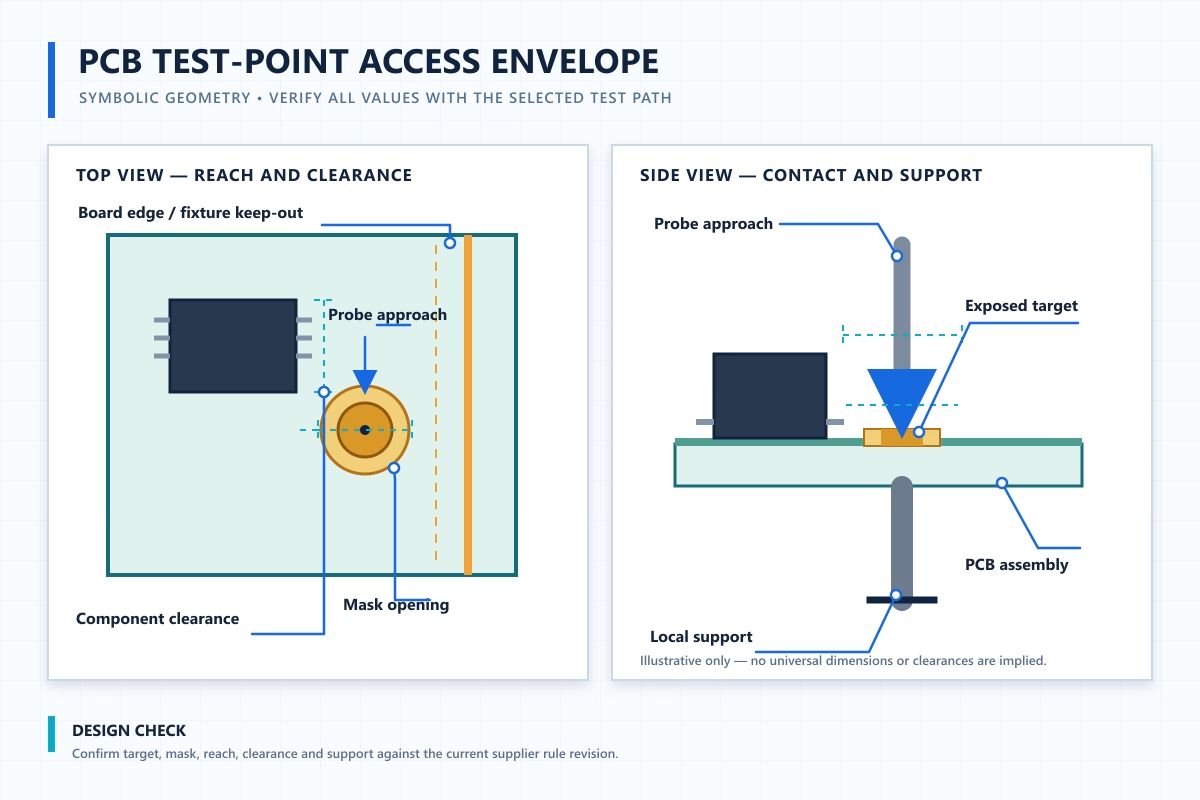
PCB test-point access envelope. All dimensions and clearances are symbolic; verify them against the selected assembler, tester, probe, and fixture rules.
Distribute Contact and Support Deliberately
Coordinate the target pattern with tooling holes, fiducials, clamps, support pins, vacuum features, and panel rails. Avoid concentrating contacts in an area that lacks appropriate support. The fixture designer must judge the resulting mechanical load and deflection for the actual board and probe configuration.
If the assembly is delivered in a panel, align this review with the panel-for-assembly requirements, because rails, breakaways, tooling, and clamps can change access.
Keep Later Processes from Hiding the Target
Verify that the released solder-mask data exposes the intended contact area. Then check downstream materials and variants. Conformal coating, potting, labels, adhesives, residues, optional parts, and DNP configurations can cover or obstruct a target that was open in the nominal CAD view.
Plan for Dense Boards, BGAs, and High-Speed Nets
When full physical access is unrealistic, preserve the highest-value targets and design a complementary coverage strategy instead of forcing pads or stubs into sensitive routing.
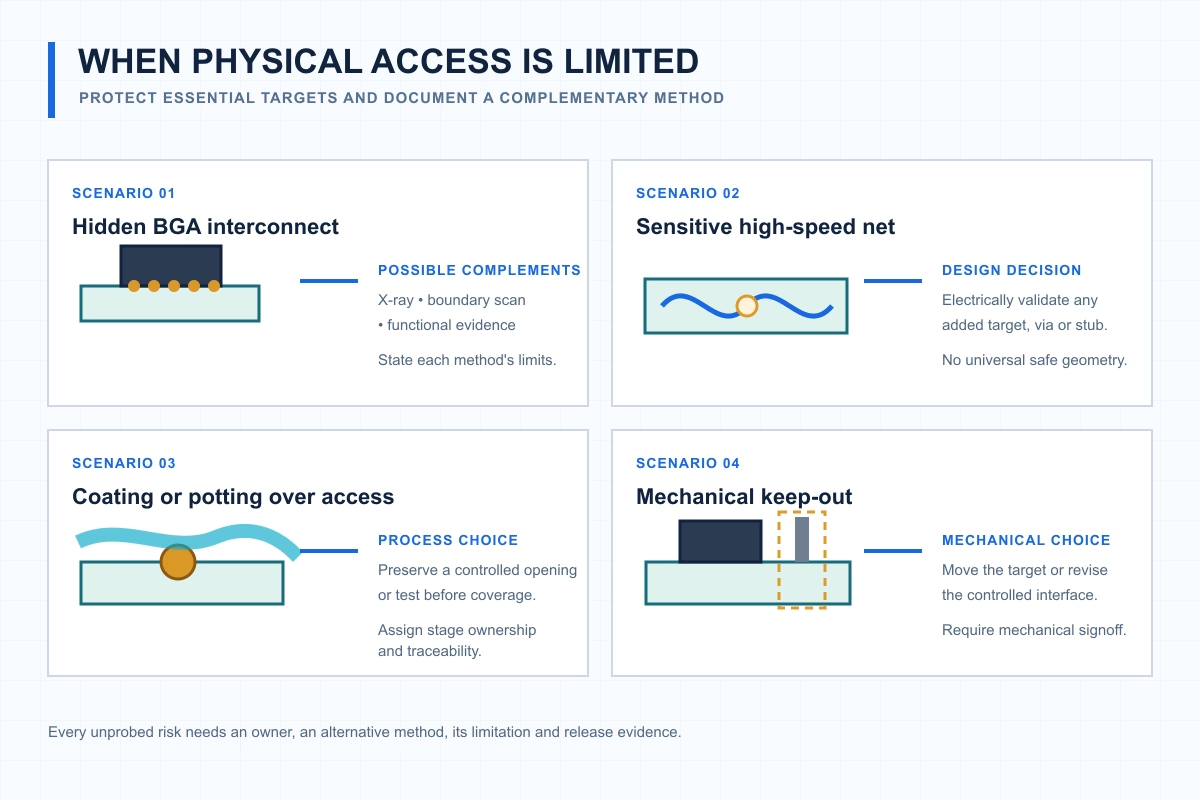
Limited access is a coverage decision: preserve essential targets and document the alternative method, its limits and its owner.
Decide Which Physical Points Remain Essential
Prioritize the access needed for safe power-up, programming or recovery, and useful fault isolation. Before adding a pad, via, neck-down, or stub to a high-speed or sensitive analog net, confirm its electrical impact through the project’s normal signal- or power-integrity process. There is no universal geometry that is automatically safe for every interface.
Allocate Inaccessible Risks to Complementary Methods
Where supported, boundary scan may address some digital interconnect risks. AOI can inspect visible placement and solder features, while X-ray may help assess applicable hidden-joint features. Functional testing can verify powered behavior, and flying probe or limited ICT can cover selected physical targets. Each method has limitations, so the test plan should combine them according to the defect or behavior being addressed.
OrinewPCB publicly describes AOI, X-ray, ICT, and functional-test options; the methods used on a particular build remain subject to project scope and agreement.
Make the Coverage Gap Visible
For every intentionally unprobed risk, name the alternative method, its limitation, the responsible owner, and the evidence required at release. This avoids treating “not physically accessible” as “automatically tested elsewhere.”
The decision table below makes that tradeoff explicit:
| Access problem | Physical redesign option | Complementary method | Limitation | Release evidence required |
| Target blocked by component body | Relocate target or revise placement if electrically/mechanically acceptable | Flying probe from another valid side, ICT redesign, or functional check as applicable | Alternative may observe behavior rather than isolate the same fault | Approved DFT review and updated access data |
| BGA interconnect not externally accessible | Preserve supported chain access or selected breakout targets where design permits | X-ray, boundary scan, and/or functional test as applicable | No single method proves every possible defect | Method-specific coverage statement and acceptance criteria |
| Sensitive high-speed net | Avoid or electrically validate added target/stub | Boundary scan or end-to-end functional test where supported | May not isolate the physical fault location | Electrical review plus test evidence |
| Mechanical keep-out or enclosure conflict | Move the target or revise the fixture/product interface | Controlled connector or alternate-side access | Product mechanics may still limit repeatability | Mechanical signoff and interface definition |
| Coating or potting over target | Mask the target area if the process allows, or move the interface | Pre-coating test or functional test | Later-process defects may remain outside the earlier test | Process-stage ownership and traceability record |
Run the Pre-Release DFT Review
Freeze the PCB only after the test strategy, supplier rules, mechanical model, access data, and release documentation agree with the selected assembly and test path.
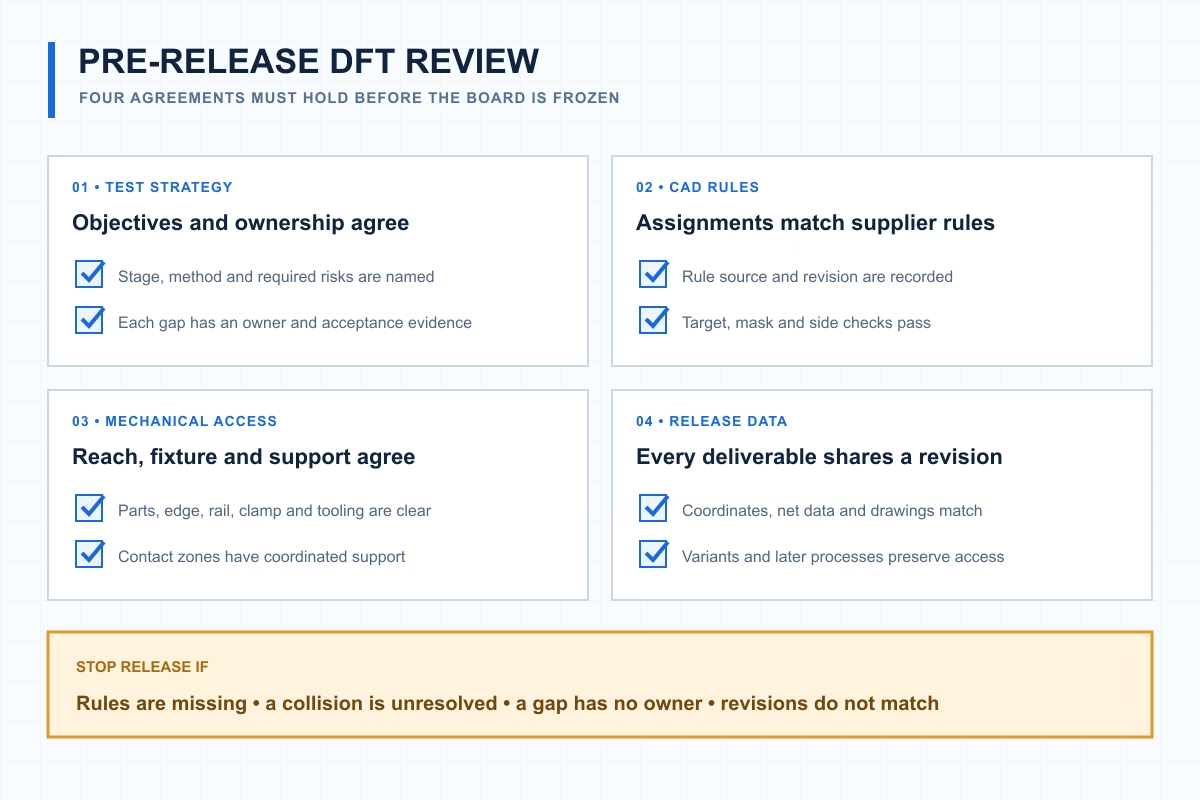
The detailed checklist reduces to four agreements: strategy, CAD rules, mechanical access and synchronized release data.
What to Send the Assembler or Fixture Vendor
Send synchronized design data and test intent before the build. The supplier can then verify access, define tooling or programming scope, and identify coverage gaps.
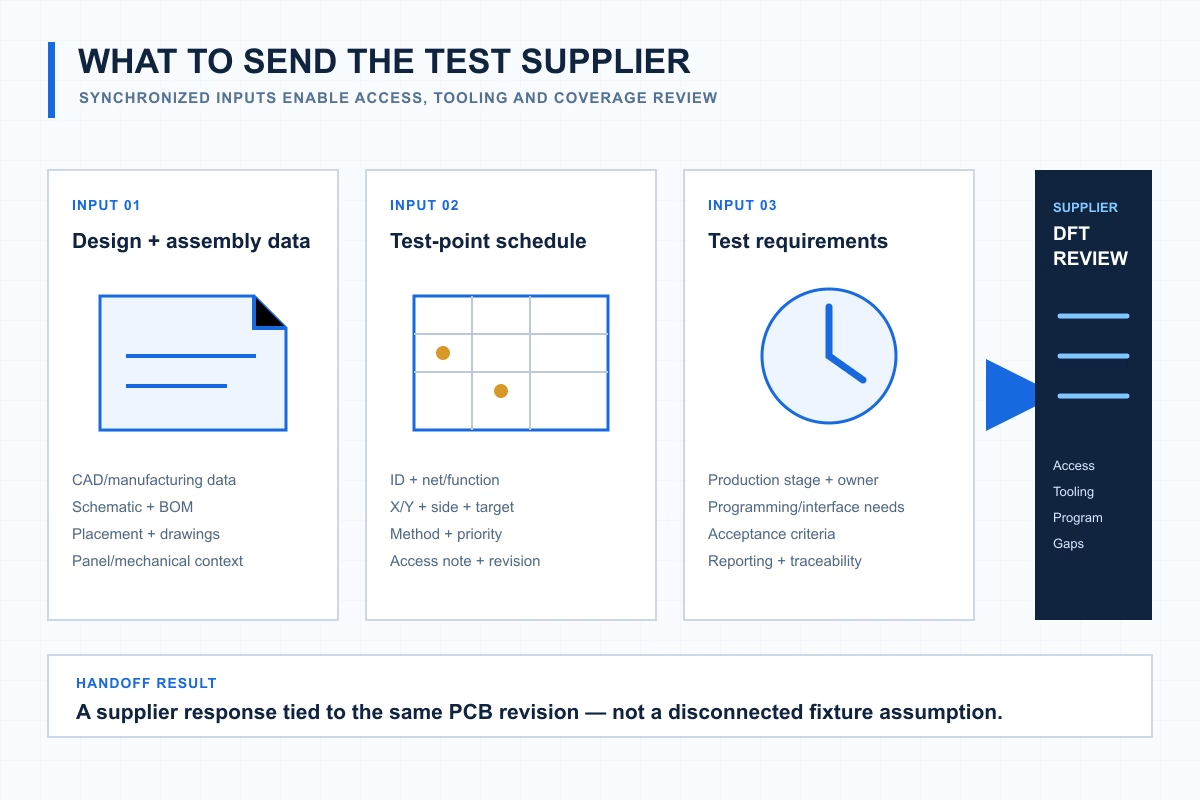
A usable handoff combines design data, a test-point schedule and test requirements under the same PCB revision.
Design and Assembly Data
Provide the native CAD data or agreed manufacturing outputs, fabrication and assembly files, schematic, BOM, placement data, assembly drawings, and relevant panel and mechanical information. Confirm the expected revision and identify variants or DNP configurations that change access.
Test-Point Schedule
The schedule should connect each physical location to its purpose and revision:
| TP ID | Net/function | X | Y | Side | Target type | Intended method | Priority | Keep-out/access note | Revision |
| Project-defined | Project-defined | From released design | From released design | Top/bottom as applicable | Approved feature type | Agreed method | Risk-based | Mechanical or process constraint | Matching PCB revision |
Coordinate origin, units, rotation, panel-versus-unit reference, and side-view convention must be explicit. A correct coordinate without a shared convention can still place a probe on the wrong location.
Test Requirements and Acceptance
State the intended manufacturing stage, responsible party, and programming or configuration inputs. Include powered-test and interface requirements, the expected coverage or gap-review output, acceptance criteria, and traceability needs. If the test supplier will develop a fixture or program, make that scope explicit in the request.
Standards and data formats must also stay within their proper boundaries:
- IPC-D-356Bdescribes a bare-substrate electrical-test data format. It is not the entire assembled-board test package.
- IPC-9252Bconcerns electrical testing of unpopulated printed boards. It does not by itself establish assembly-test readiness.
- The IPC document revision tablelists IPC-2221C as Revision C dated December 2023. Check the current status and purchased standard text before citing a requirement or clause.
- IEEE 1149.1-2013is listed as inactive-reserved, while 1 is an active revision project. Do not label the 2013 edition “current” without qualification.
Use the PCB assembly quote checklist to assemble the wider RFQ package, or request an assembly quote when the test scope and data are ready.
FAQ
What Size Should a PCB Test Point Be?
Use the current requirement for the selected tester, probe, fixture, and manufacturer. The exposed target, mask opening, positional tolerances, spacing, and contact method must be evaluated together; a universal size cannot represent every assembly and test setup.
Can a Via or Component Pad Be Used as a Test Point?
Sometimes. The applicable supplier rule set must permit the feature, and it must remain exposed and reachable after assembly. It must also tolerate the contact method without compromising its primary electrical or assembly function. CAD support for assigning pads or vias does not prove that a particular feature is production-ready.
Does Every Net Need a Dedicated Assembly Test Point?
Not automatically. Required access follows the test objective, defect risks, product architecture, and agreed coverage plan. Any inaccessible or intentionally unprobed risk needs a documented alternative method, limitation, owner, and acceptance evidence.
Does Flying Probe Remove the Need for DFT Rules?
No. Flying probe changes the access mechanism and may reduce dedicated fixture hardware, but it still needs valid contact targets, approach paths, coordinates, suitable support, and an accurate test program.
Sources
- IPC Document Revision Table— IPC; accessed October 19, 2026.
- IPC-D-356B: Bare Substrate Electrical Test Data Format— IPC; October 2002.
- 1 Active Revision Project— IEEE Standards Association; status accessed October 19, 2026.
- IEEE 1149.1-2013 Status— IEEE Standards Association; status accessed October 19, 2026.
ASSEMBLY TEST ACCESS
Need a Test-Access Review Before Your PCB Assembly Release?
Share your PCB data, schematic and BOM, target quantity, intended test method, and available test requirements. OrinewPCB can respond with a project-specific review and quotation based on the agreed scope. PCB fabrication and assembly services are available, with AOI, X-ray, ICT, and functional-test options subject to project requirements and confirmation.
- +PCB fabrication + assembly
- +AOI, X-ray, ICT & functional-test options
Get Quote Free